


Vista Auction
3.654.00 Reviews
App Specs
- Version
- 1.16.0
- Updated On
- License
- Free
- Downloads
- 10,000+
- Developer
- Vista Auction
- Categories
- Shopping
- Platform
- Android
Screenshots


 Analysis by AppCompare
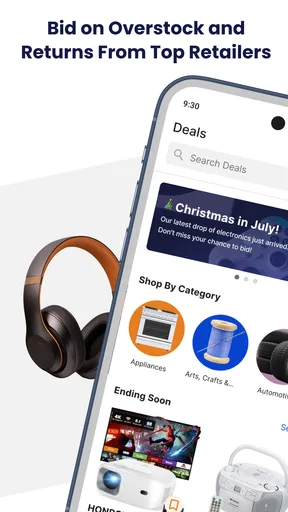
I approached Vista Auction as a practical shopping tool rather than as a place to browse endlessly. Its basic promise is simple: connect local buyers with auction listings so they can bid from a phone and follow the outcome without relying entirely on a desktop browser or a physical auction room. That makes it interesting for anyone who enjoys finding nearby items, but the experience depends heavily on how clearly each listing is presented and how disciplined the bidder is.
The app is free, aimed at everyone, and comes from Vista Auction. It sits in the shopping category, although it feels more specialized than a normal retail marketplace. You are not simply choosing an item, adding it to a cart, and waiting for delivery. The important moment is the handoff between discovering a listing, deciding what it is worth, placing a bid, and dealing with whatever happens after the auction ends.
My overall impression is cautiously positive. Vista Auction can make local bidding more convenient, especially when I already know what kind of item I want to watch. At the same time, it rewards preparation more than impulse. The app is not a substitute for inspecting an item, understanding collection arrangements, or setting a firm spending limit before the excitement of an auction takes over.
From a local search to a finished purchase
I find the most useful way to approach a local auction is to begin with a practical question: what would make this item worth the trip if I won it? That keeps browsing focused and gives me a sensible basis for judging a listing before the bidding starts. From there, I can look at how to turn a promising search into a purchase I can actually follow through on.
Starting with a clear reason to open the app
The best way to use Vista Auction is to begin with a specific need. I would open it because I am looking for a particular type of local item, want to check what is currently available, or plan to monitor an auction rather than casually scroll. That starting condition matters because auction apps can become distracting when every listing looks like a possible bargain.
Unlike a conventional shopping app, the displayed amount is not automatically the final amount I will pay. A low current bid may be attractive, but it can also invite more competition. I treat the first pass through the listings as research: I look at the item description, examine the available images, note the auction timing, and consider whether the location is realistic for me.
This is one of the first useful habits with Vista Auction: I separate finding an opportunity from deciding to bid. Saving mental space for that second decision helps prevent a familiar mistake—confusing a cheap opening position with a genuinely good deal.
Worth Reading Before You Choose

EA SPORTS FC Mobile 26 Is a Bigger Football Game, but It Takes Time

Flipboard Shows What News Apps Must Do Beyond the Feed

Switching to Android Auto Means Rethinking Your Driving Routine

Google Calendar Makes a Crowded Week Easier to Manage

Ludo King Makes the Most of the Minutes Between Plans

Baby Panda World Brings Quick Play to Modern Phones, but Its Game Library Feels Busy
Reading a listing like a buyer, not a browser
Once I find something appealing, I slow down. A local auction listing needs more attention than a standard product page because condition, completeness, and collection details can affect the value more than the photograph suggests. I compare the wording with the images and look for practical questions such as whether accessories are included, whether visible wear matters, and whether the item would be difficult to transport.
I also think about the handoff before placing a bid. If I win, where will the item go next? Will I need to collect it myself? Can I arrange the trip at a sensible time? Is the item small enough to carry, or would transport change the economics of the purchase? Vista Auction is most useful when I answer those questions early rather than treating them as a problem for later.
A helpful workflow is to make a private ceiling before bidding. I estimate the item’s value, add the effort of collecting it, and leave room for disappointment if the condition is less impressive in person. That ceiling is more important than the current bid because the current bid only describes the auction’s present stage, not the final value for me.
Moving from interest to an actual bid
The bidding step is where Vista Auction becomes different from ordinary shopping. Instead of making a single purchase decision, I am entering a changing situation. Other bidders may appear, and the item may become less attractive as the price rises. I prefer to decide my maximum in advance and treat it as a boundary, not as a challenge to overcome.
That approach also answers a common practical question: is the app suitable for casual bargain hunting? Yes, but only if “casual” does not mean careless. A small bid can still create a real obligation if it wins, so I would not bid on an item merely because the opening amount looks tempting. I would bid when I am comfortable with the item, the location, and the likely follow-up work.
The current version is 1.16.0, and the app requires Android 8.0 or newer. Those details make it accessible to many Android users, including people who keep an older phone for everyday tasks. Still, compatibility does not remove the need to check the app’s behavior on the specific device I use for time-sensitive bidding. A stable connection and a charged phone are more valuable here than they might be during ordinary browsing.
The handoffs that decide whether the experience works
The most important handoff is between the app and the listing itself. Vista Auction can help me discover and pursue an item, but the quality of my decision still depends on the information attached to that listing. If the description is brief or the images leave questions unanswered, I have to be more conservative. The app cannot turn uncertainty into certainty.
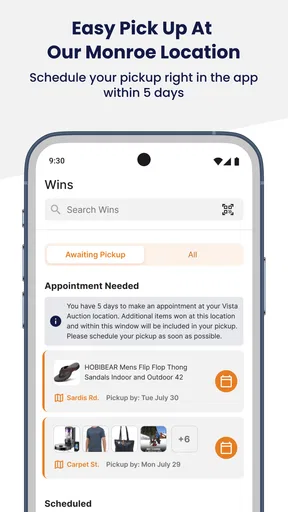
The next handoff is between the winning bid and the seller or auction process. This is where a digital action becomes a real-world task. I may need to keep track of what I won, remember the relevant collection details, and make sure I arrive prepared. I would take a screenshot or write down the key listing information for my own records, particularly when I am following several auctions at once.
That simple record-keeping step is one of the less obvious ways to make the app easier to use. A phone notification or a quick glance at the app can tell me what is happening, but a personal note helps separate “items I watched” from “items I actually won.” It also makes it easier to plan collection trips instead of treating every auction as an isolated event.
There is another handoff between emotional momentum and financial judgment. Auctions are designed around changing prices and limited windows, so I try not to make my maximum bid while feeling rushed. If I would not buy the item at my own ceiling after taking a short break, I probably should not bid at that level just because someone else has pushed the amount higher.
What a successful outcome looks like
For me, a successful Vista Auction result is not simply winning. It is winning an item that remains worthwhile after considering its condition, location, transport, and the time needed to complete the collection. That is why the app works best for local buyers who can act on an opportunity without complicated delivery expectations.
Imagine that I am furnishing a spare room and notice a suitable piece listed nearby. I inspect the photos, compare the apparent condition with what I need, decide the maximum amount I am willing to spend, and check whether I can collect it during the available window. If I win below that ceiling, the app has done its job well: it has connected me with a local opportunity that a standard online retailer might not offer.
The outcome is less satisfying if I focus only on the winning message. A bargain that requires an inconvenient trip, extra repair work, or equipment to move may no longer be a bargain. Vista Auction encourages a more complete definition of value, and that is a strength when I use it deliberately.
Where the flow breaks down
The workflow can break before bidding if a listing does not answer the questions that matter to me. Unclear condition, limited visual detail, or uncertainty about the next step can turn an appealing item into a gamble. In that situation, I would rather skip the listing than use the bid itself as a way to discover whether the purchase makes sense.
It can also break during the bidding stage. A phone-based auction is convenient, but convenience can create false confidence. A small screen is not always the ideal place to compare several listings, reread details, and calculate the total effort involved. I prefer to do the careful evaluation before the final bidding window, when there is less pressure.
The final break happens after winning. Anyone expecting a normal retail checkout may find the transition less smooth because the purchase is tied to a local auction process rather than a simple delivery promise. Vista Auction is therefore not the right choice for someone who wants predictable stock, transparent fixed pricing, and a familiar parcel arriving at the door.
How it compares with ordinary shopping alternatives
Compared with a standard retail app, Vista Auction offers the possibility of finding local items through bidding instead of paying a fixed listed price. That can create opportunities for buyers who are patient and willing to collect purchases themselves. It also changes the rhythm of shopping: I spend more time judging timing, competition, and practical follow-through.
Compared with a broad marketplace, the appeal is the auction-focused workflow and the local angle. A general marketplace may offer more product variety or more familiar purchase and delivery steps, while Vista Auction feels better suited to someone who specifically wants to participate in auctions. If I need a replacement item quickly, I would choose a conventional retailer. If I want to explore local auction inventory and can accept uncertainty, this app is more relevant.
It is also different from attending an auction in person. The app reduces the need to be physically present at the discovery and bidding stages, which is useful for people with busy schedules or limited access to local venues. However, the digital screen does not replace physical inspection. For condition-sensitive purchases, I would still value any opportunity to understand the item directly before committing.
Who will get the most from it
Vista Auction suits patient shoppers, collectors, people furnishing a home on a budget, and anyone comfortable planning around local collection. It can also work for users who enjoy monitoring several possibilities and are willing to walk away when the price moves beyond their limit.
I would be more cautious recommending it to someone who dislikes variable prices, needs guaranteed availability, or cannot easily manage collection after winning. It is also a poor match for buyers who tend to bid first and research later. The app makes local auctions easier to access, but it does not remove the responsibility that comes with bidding.
The public response gives the app an average rating of 3.5 from around 116 ratings, with roughly 54 written reviews. I read that as a sign to keep expectations measured: there is enough interest to make the service worth exploring, but not enough evidence for me to treat it as universally polished or suitable for every shopping style.
Small habits that improve the experience
My first tip is to group decisions by collection area. If I am watching multiple local listings, I consider whether a single trip could handle more than one successful purchase. That does not guarantee that the timing will line up, but it helps me judge the real convenience of bidding on nearby items.
My second tip is to use a two-stage limit. I set an ideal amount and an absolute maximum, then stop once the absolute maximum is reached. The ideal amount tells me when the opportunity is attractive; the hard limit protects me when competition turns the auction into an emotional contest.
My third tip is to review the listing immediately before bidding rather than relying on what I remember from an earlier glance. Details that seemed minor at first—size, visible damage, included parts, or collection requirements—can become decisive once money is involved. This final check is especially valuable when I have been following an item for a while.
My fourth tip is to plan the post-auction handoff before the auction ends. I keep transport, time, and storage in mind, because a successful bid creates a task rather than completing the entire shopping journey. This is the difference between using Vista Auction as a thoughtful local-shopping tool and using it as a source of impulsive purchases.
Final assessment of the local bidding experience
Vista Auction is a focused shopping app for people who want to bid on local auction items from an Android phone. Its free price and Everyone content rating make it easy to try, while its relatively modest install base—over ten thousand installs—suggests that I should approach it as a specialized service rather than a universal marketplace.
I like the way it brings the discovery and bidding stages closer together, especially when I already have a clear idea of what I am looking for. The strongest results come from treating every listing as a small project: inspect the information, set a limit, think through collection, and accept that walking away is sometimes the smartest outcome.
My recommendation is to try Vista Auction if local pickup and auction-style buying genuinely fit your routine. I would not choose it instead of a fixed-price retailer when I need speed, certainty, or home delivery. Used with patience, though, it can turn a nearby auction into a manageable mobile workflow—from the first search to the final handoff—without pretending that the app can make the judgment for me.
Pros
- Easy access to live and upcoming auctions from a mobile device.
- Useful search tools help users find specific vehicles or auction listings.
- Listing details can make it easier to compare available items before bidding.
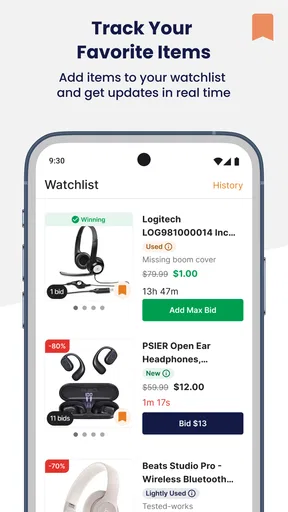
- Push notifications may help users keep track of auction updates and deadlines.
- Convenient option for buyers already familiar with Vista Auction services.
Cons
- Some listings may provide limited information or incomplete vehicle histories.
- Bidding competition can make final prices higher than initially expected.
- The app may be less useful outside regions served by Vista Auction.
- Users may need a separate account or approval before placing bids.
- Auction schedules and availability can change with little notice.
FAQs for Vista Auction
What is Vista Auction, and how does it work?
Vista Auction is an online auction platform where users can browse available lots, review item information, and place bids through a mobile device. After creating an account, you can follow auctions, monitor competing bids, and receive updates about lots that interest you. The exact auction process, available categories, and bidding rules may vary, so reading each listing and the platform’s terms before bidding is important.
Do I need an account to place bids on Vista Auction?
In most cases, you can browse auction listings without registering, but an account is required to participate actively. Registration may involve providing contact details and accepting the platform’s terms and conditions. Depending on the auction and your location, additional verification or payment information may be requested. Make sure your profile details are accurate because they may be used for notifications, invoices, and delivery arrangements.
Are there additional fees when buying an item through Vista Auction?
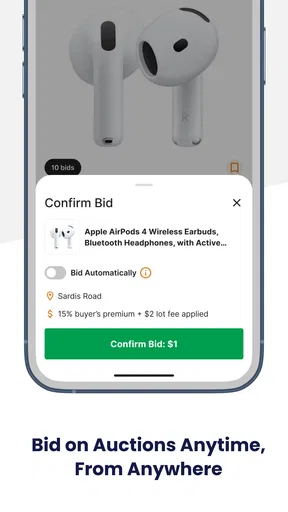
The winning bid may not be the final amount you pay. Depending on the listing, additional costs can include a buyer’s premium, taxes, service charges, shipping, handling, or collection fees. Before placing a bid, review the lot description and any displayed auction terms carefully. If the total cost is unclear, contact the auction organizer rather than assuming that the bid amount includes every expense.
Can I cancel a bid or return an item purchased on Vista Auction?
Auction bids are commonly treated as binding commitments, meaning you may not be able to cancel one simply because you changed your mind. Return rights can also differ from ordinary online shopping, particularly for used, collectible, or privately sold items. Always inspect the listing, photographs, condition report, seller information, and cancellation policy before bidding. If an error occurs, contact support immediately, although cancellation is not guaranteed.
Is Vista Auction safe to use, and what should I check before bidding?
Vista Auction can be useful for discovering auction lots, but users should still make careful decisions before committing money. Check that the app was downloaded from an official store, keep your login details private, and use a secure payment method. Read seller or auction-house information, item descriptions, condition notes, fees, pickup or shipping rules, and dispute procedures. Avoid bidding beyond your budget and verify suspicious messages through official support channels.


